
Skip to content
  • Solutions
    Attractions
    Water parks

    Make visits smoother and increase revenue.

    Theme parks

    Improve guest experience and boost sales effortlessly.

    Hotels & Resorts

    Turn your hotel’s amenities into a revenue machine

    Playcenters

    Seamless bookings, AI-powered upsells, and wearable tech

    Spa & Wellness Centers

    Deliver a luxury, wallet-free guest experience

    Other attractions

    See more …

    Events
    • Conferences
    • Marketing Events
    • Festivals

    Connect with us

    Set Up Call
    • Attractions
      • Waterparks
      • Hotels & Resorts
      • Theme Parks
      • Playcenters
      • Sports venues
      • Theaters and Concert Halls
    • Events
      • Conferences
      • Marketing Events
      • Festivals
  • Product
    Product
    Booking and Ticket Sales

    Sell tickets online, in venue and through channel partners

    Wearable Payments & Access

    RFID wristbands for cashless payments and control access

    Attraction POS

    Sell seasoon passes, tickets, cabanas, and extras

    Memberships and Passes

    Boost park revenue: gamified season passes & memberships

    See more …

    Next generation
    • AI Sales Agents and Analysis
    • AI for Waterparks
    • Ticketing & Booking
    • Memberships & Season Passes
    • Attraction POS
    • RFID Wristbands
    • Real Time Reporting
  • Pricing
  • Resources
    • Academy
    • Waterpark Research: Innovation
    • Blog
    • API Documentation
    • Success Stories
Log in
Book demo

1. How to - Attractions

20
  • How to Set Up Cashless Payment Systems for Theme Parks, Waterparks, and Attractions
  • How Membership Systems Make Waterparks Better for Everyone
  • How Cashless Payments Stop the “Wet Wallet” Problem at Your Waterpark
  • 📋 Checklist: Launching Your First Waterpark Membership Tier
  • A Guide to Waterpark Season Passes and Memberships
  • Recover Lost Revenue: Understanding and Managing Abandoned Carts in Oveit
  • How to Refund Tickets and Cancel Orders in Oveit
  • Box Office Ticket Sales with Instant NFC Wristband Activation
  • How to Connect Tickets to NFC Wristbands for Access Control in Parks, Attractions & FECs
  • Managing Multiple Venues and Teams in Oveit
  • How to Set Up Multi-Channel Ticket Management for Parks and Attractions
  • Multi-Channel Ticketing Software for Parks: Why It Matters and How to Get It Right
  • Theme Park Ticketing Software with Add-Ons — Upsell Guide for Waterparks & Attractions Using Oveit
  • Create Group Deals for Attractions: Theme Parks & Waterparks
  • Create Tickets & Bundles in Your Theme Park Ticketing System
  • How to Set Up an Attraction in Oveit: Quick-Start Guide to a Theme Park Ticketing System
  • Theme Park and Water Park Ticketing Software: Getting Started with Oveit
  • Attraction Ticket Bundles: Boost Sales & Streamline Group Bookings
  • Setting Up a Shared Menu Across Point of Sale Devices with Oveit Pay
  • Setting Up Check-In Staff & Scanning Users in Oveit

2. Getting Started

52
  • Setting Up the JCC Payments Gateway on Oveit & Start Selling Tickets
  • A Guide to Waterpark Season Passes and Memberships
  • Box Office Ticket Sales with Instant NFC Wristband Activation
  • How to Connect Tickets to NFC Wristbands for Access Control in Parks, Attractions & FECs
  • How to Set Up Multi-Channel Ticket Management for Parks and Attractions
  • Create Tickets & Bundles in Your Theme Park Ticketing System
  • How to Set Up an Attraction in Oveit: Quick-Start Guide to a Theme Park Ticketing System
  • Ultimate Guide to Event Ticket Bundles: Boost Sales with Corporate, Educational & Sponsor Bundles
  • How to Create an Event Registration Form
  • How to Start an Event on Oveit: A Step-by-Step Guide
  • How to Design and Print Personalized Event Badges Using Oveit
  • How to set up a seated event?
  • How can a cashless payment solution benefit club parties
  • How to Set Up Event Ticket Add-Ons on Oveit – a Step-by-Step Guide
  • How to Edit Your Event Timezone, Date, and Time Settings in Oveit
  • How to Set Up a Private, Invite-Only Ticket with Oveit
  • How to use Oveit’s built-in NFC technology for access control
  • How to Set Up a Cashless Payment System for your Event
  • Can NFC technology be used for attendee engagement?
  • How to Create an Event Registration Form on Oveit: A Step-by-Step Guide
  • How to start a conference registration on WordPress website in less than 10 minutes
  • How to set up Online and Box Office Ticketing for a Museum?
  • How to Sell Tickets for Bitcoin
  • How to Create Ticket Groups in Oveit: A Step-by-Step Guide
  • How to issue a refund for sold tickets?
  • How to add new users to your event
  • How to improve the user experience within a theme park
  • How can a modern cashless payment solution benefit a hotel or resort
  • How to sell tickets through Callpay
  • What is RTMP and how can it help me stream live content?
  • Selling tickets on Eventbrite? Broadcast your content with Streams.live
  • How to add pre-recorded content (media) to your channel
  • How to sell tickets for crypto
  • How to claim your NFT ticket using the MetaMask mobile App
  • How to Sell Tickets with Stripe
  • How the Event Registration Form Works on Oveit (the Visitor’s View)
  • How to Create an Event Registration Link
  • Understanding the Difference Between Oveit Customer Form and Registration (Guest) Form
  • How to Switch Languages in the Event Registration Widget with Oveit
  • How to Customize the Event Registration Design on Oveit Hub
  • Boost Event Sales: How to Set Up Bulk Ticket Discounts on Oveit
  • How to Use a Discount Code
  • Boost event ticket sales and signups: Using Google Tag Manager with Oveit to improve conversions
  • How to claim your NFT without us collecting any personal data
  • How to Receive Email Notifications for Ticket Orders on Oveit
  • How to Send Event Tickets from Your Own Domain Using Oveit and Mailgun
  • How to Set Up Ticketing for Attractions: A Full Guide
  • How to Use Private Invitation Codes and Discount Vouchers in Oveit
  • How to Create Personalized Badges for Your Event with Oveit
  • How to Set Up Water Park Ticketing Software and Wearables with Oveit
  • How to Resend Tickets Using Oveit
  • Tutorial Oveit: Setting Up Bank Transfer / ACH for Ticket Sales

3. Developer Docs

14
  • Setting Up the JCC Payments Gateway on Oveit & Start Selling Tickets
  • Building an NFC Wristband Scanning System with Oveit’s Tickets API
  • Batch Wallet Transactions API
  • How to use Oveit’s built-in NFC technology for access control
  • How to improve the user experience within a theme park
  • How to claim your NFT ticket using the MetaMask mobile App
  • How to Switch Languages in the Event Registration Widget with Oveit
  • Boost event ticket sales and signups: Using Google Tag Manager with Oveit to improve conversions
  • How to claim your NFT without us collecting any personal data
  • How to Send Event Tickets from Your Own Domain Using Oveit and Mailgun
  • How Event Organizers Can Extract Tax Details and Manage EU VAT Compliance Using Oveit
  • How to sell tickets through Callpay
  • How to Buy Tickets with Crypto
  • Connecting Event Registration Data with Zapier and Oveit

4. Using Oveit

64
  • How Membership Systems Make Waterparks Better for Everyone
  • A Guide to Waterpark Season Passes and Memberships
  • Recover Lost Revenue: Understanding and Managing Abandoned Carts in Oveit
  • How to Refund Tickets and Cancel Orders in Oveit
  • Managing Multiple Venues and Teams in Oveit
  • Create Group Deals for Attractions: Theme Parks & Waterparks
  • Setting Up a Shared Menu Across Point of Sale Devices with Oveit Pay
  • How to Create an Event Registration Form
  • How to Set Up Table Seating Maps for Events in Oveit
  • How to Start an Event on Oveit: A Step-by-Step Guide
  • How to Design and Print Personalized Event Badges Using Oveit
  • How to set up a seated event?
  • Maximising the number of event registrations
  • How can a cashless payment solution benefit club parties
  • How to Set Up Event Ticket Add-Ons on Oveit – a Step-by-Step Guide
  • How to Edit Your Event Timezone, Date, and Time Settings in Oveit
  • Understanding the Costs and Value of Oveit: Starter, Pro, and Hub Plans
  • How to Set Up a Private, Invite-Only Ticket with Oveit
  • Terms and Conditions checkbox (with active link)
  • How to use Oveit’s built-in NFC technology for access control
  • How to Set Up a Cashless Payment System for your Event
  • Can NFC technology be used for attendee engagement?
  • How to Create an Event Registration Form on Oveit: A Step-by-Step Guide
  • How to start a conference registration on WordPress website in less than 10 minutes
  • How to Set Up Event Signups Notifications on Oveit
  • How do I add free attendees to my event?
  • How to set up Online and Box Office Ticketing for a Museum?
  • How do I find an attendee that visited my previous events?
  • How to Sell Tickets for Bitcoin
  • How to Create Ticket Groups in Oveit: A Step-by-Step Guide
  • How to issue a refund for sold tickets?
  • How to add new users to your event
  • How to improve the user experience within a theme park
  • How can a modern cashless payment solution benefit a hotel or resort
  • How to sell tickets through Callpay
  • How to sell tickets for crypto
  • How to claim your NFT ticket using the MetaMask mobile App
  • How to Sell Tickets with Stripe
  • How the Event Registration Form Works on Oveit (the Visitor’s View)
  • How to Create an Event Registration Link
  • Understanding the Difference Between Oveit Customer Form and Registration (Guest) Form
  • How to Switch Languages in the Event Registration Widget with Oveit
  • How to Customize the Event Registration Design on Oveit Hub
  • Boost Event Sales: How to Set Up Bulk Ticket Discounts on Oveit
  • How to Use a Discount Code
  • Boost event ticket sales and signups: Using Google Tag Manager with Oveit to improve conversions
  • How to claim your NFT without us collecting any personal data
  • How to Create Digital Personalized Certificates or Diplomas for Your Event Visitors
  • How to Receive Email Notifications for Ticket Orders on Oveit
  • How to Send Event Tickets from Your Own Domain Using Oveit and Mailgun
  • How to Set Up Ticketing for Attractions: A Full Guide
  • How Closed-Loop Payments Work for Attractions, Resorts, and Festivals
  • How Event Organizers Can Extract Tax Details and Manage EU VAT Compliance Using Oveit
  • Box Office Ticketing Software: A Simple Guide for Events and Attractions
  • How to Buy Tickets with Crypto
  • How to Use Private Invitation Codes and Discount Vouchers in Oveit
  • How to Create Personalized Badges for Your Event with Oveit
  • Tracking Venue Attendance and Capacity Needs with Oveit
  • How to Set Up Water Park Ticketing Software and Wearables with Oveit
  • How to Resend Tickets Using Oveit
  • Connecting Event Registration Data with Zapier and Oveit
  • How to Import Sponsors, Complimentary, and Speakers’ Tickets in Oveit
  • Understanding the “Pending” Status in Oveit Orders
  • Tutorial Oveit: Setting Up Bank Transfer / ACH for Ticket Sales

5. Oveit Hub

40
  • How to Set Up Cashless Payment Systems for Theme Parks, Waterparks, and Attractions
  • Box Office Ticket Sales with Instant NFC Wristband Activation
  • Theme Park Ticketing Software with Add-Ons — Upsell Guide for Waterparks & Attractions Using Oveit
  • Create Group Deals for Attractions: Theme Parks & Waterparks
  • Create Tickets & Bundles in Your Theme Park Ticketing System
  • How to Set Up an Attraction in Oveit: Quick-Start Guide to a Theme Park Ticketing System
  • Ultimate Guide to Event Ticket Bundles: Boost Sales with Corporate, Educational & Sponsor Bundles
  • Attraction Ticket Bundles: Boost Sales & Streamline Group Bookings
  • How to Create an Event Registration Form
  • How to Set Up Table Seating Maps for Events in Oveit
  • How to Start an Event on Oveit: A Step-by-Step Guide
  • How to Design and Print Personalized Event Badges Using Oveit
  • How to set up a seated event?
  • How to Set Up Event Ticket Add-Ons on Oveit – a Step-by-Step Guide
  • Understanding the Costs and Value of Oveit: Starter, Pro, and Hub Plans
  • How to Set Up a Private, Invite-Only Ticket with Oveit
  • Terms and Conditions checkbox (with active link)
  • How to use Oveit’s built-in NFC technology for access control
  • How to Set Up a Cashless Payment System for your Event
  • Can NFC technology be used for attendee engagement?
  • How to Create an Event Registration Form on Oveit: A Step-by-Step Guide
  • How to Set Up Event Signups Notifications on Oveit
  • How to set up Online and Box Office Ticketing for a Museum?
  • How do I find an attendee that visited my previous events?
  • How to Create Ticket Groups in Oveit: A Step-by-Step Guide
  • How can a modern cashless payment solution benefit a hotel or resort
  • How to Customize the Event Registration Design on Oveit Hub
  • Boost Event Sales: How to Set Up Bulk Ticket Discounts on Oveit
  • Boost event ticket sales and signups: Using Google Tag Manager with Oveit to improve conversions
  • How to Create Digital Personalized Certificates or Diplomas for Your Event Visitors
  • How to Receive Email Notifications for Ticket Orders on Oveit
  • How to Set Up Ticketing for Attractions: A Full Guide
  • How Closed-Loop Payments Work for Attractions, Resorts, and Festivals
  • How Event Organizers Can Extract Tax Details and Manage EU VAT Compliance Using Oveit
  • Box Office Ticketing Software: A Simple Guide for Events and Attractions
  • How to Buy Tickets with Crypto
  • How to Use Private Invitation Codes and Discount Vouchers in Oveit
  • How to Create Personalized Badges for Your Event with Oveit
  • How to Set Up Water Park Ticketing Software and Wearables with Oveit
  • Connecting Event Registration Data with Zapier and Oveit

6. Tips and Tricks

37
  • How Cashless Payments Stop the “Wet Wallet” Problem at Your Waterpark
  • 📋 Checklist: Launching Your First Waterpark Membership Tier
  • Recover Lost Revenue: Understanding and Managing Abandoned Carts in Oveit
  • How to Set Up Multi-Channel Ticket Management for Parks and Attractions
  • Multi-Channel Ticketing Software for Parks: Why It Matters and How to Get It Right
  • How to Design and Print Personalized Event Badges Using Oveit
  • Maximising the number of event registrations
  • How can a cashless payment solution benefit club parties
  • How to Set Up Event Ticket Add-Ons on Oveit – a Step-by-Step Guide
  • How to Set Up a Private, Invite-Only Ticket with Oveit
  • Terms and Conditions checkbox (with active link)
  • How to use Oveit’s built-in NFC technology for access control
  • Can NFC technology be used for attendee engagement?
  • How to start a conference registration on WordPress website in less than 10 minutes
  • How to Set Up Event Signups Notifications on Oveit
  • How do I add free attendees to my event?
  • How to set up Online and Box Office Ticketing for a Museum?
  • How do I find an attendee that visited my previous events?
  • How to Sell Tickets for Bitcoin
  • How to Create Ticket Groups in Oveit: A Step-by-Step Guide
  • How to issue a refund for sold tickets?
  • How to add new users to your event
  • How to improve the user experience within a theme park
  • How to sell tickets for crypto
  • How to claim your NFT ticket using the MetaMask mobile App
  • How to Sell Tickets with Stripe
  • How the Event Registration Form Works on Oveit (the Visitor’s View)
  • How to Create an Event Registration Link
  • Understanding the Difference Between Oveit Customer Form and Registration (Guest) Form
  • How to Switch Languages in the Event Registration Widget with Oveit
  • Boost Event Sales: How to Set Up Bulk Ticket Discounts on Oveit
  • How to Use a Discount Code
  • How to claim your NFT without us collecting any personal data
  • Box Office Ticketing Software: A Simple Guide for Events and Attractions
  • How to Buy Tickets with Crypto
  • How to Resend Tickets Using Oveit
  • How to Import Sponsors, Complimentary, and Speakers’ Tickets in Oveit

7. Video Tutorials

34
  • How to Set Up Cashless Payment Systems for Theme Parks, Waterparks, and Attractions
  • How Membership Systems Make Waterparks Better for Everyone
  • Box Office Ticket Sales with Instant NFC Wristband Activation
  • How to Connect Tickets to NFC Wristbands for Access Control in Parks, Attractions & FECs
  • Managing Multiple Venues and Teams in Oveit
  • How to Set Up Multi-Channel Ticket Management for Parks and Attractions
  • Theme Park Ticketing Software with Add-Ons — Upsell Guide for Waterparks & Attractions Using Oveit
  • Create Group Deals for Attractions: Theme Parks & Waterparks
  • Create Tickets & Bundles in Your Theme Park Ticketing System
  • How to Set Up an Attraction in Oveit: Quick-Start Guide to a Theme Park Ticketing System
  • Theme Park and Water Park Ticketing Software: Getting Started with Oveit
  • Ultimate Guide to Event Ticket Bundles: Boost Sales with Corporate, Educational & Sponsor Bundles
  • Attraction Ticket Bundles: Boost Sales & Streamline Group Bookings
  • Setting Up a Shared Menu Across Point of Sale Devices with Oveit Pay
  • How to Create an Event Registration Form
  • How to Set Up Table Seating Maps for Events in Oveit
  • How to Start an Event on Oveit: A Step-by-Step Guide
  • How to Design and Print Personalized Event Badges Using Oveit
  • How to Set Up a Cashless Payment System for your Event
  • How to Create an Event Registration Form on Oveit: A Step-by-Step Guide
  • How to improve the user experience within a theme park
  • How can a modern cashless payment solution benefit a hotel or resort
  • What is RTMP and how can it help me stream live content?
  • How to sell tickets for crypto
  • How to claim your NFT ticket using the MetaMask mobile App
  • How to Sell Tickets with Stripe
  • How to Create an Event Registration Link
  • How to Create Digital Personalized Certificates or Diplomas for Your Event Visitors
  • How to Set Up Ticketing for Attractions: A Full Guide
  • How Closed-Loop Payments Work for Attractions, Resorts, and Festivals
  • Box Office Ticketing Software: A Simple Guide for Events and Attractions
  • How to Buy Tickets with Crypto
  • Connecting Event Registration Data with Zapier and Oveit
  • How to Import Sponsors, Complimentary, and Speakers’ Tickets in Oveit

8. Using Streams.Live

3
  • What is RTMP and how can it help me stream live content?
  • Selling tickets on Eventbrite? Broadcast your content with Streams.live
  • How to add pre-recorded content (media) to your channel

Compare

6
  • Understanding the Costs and Value of Oveit: Starter, Pro, and Hub Plans
  • Oveit: The Best Whova Alternative for Events Not Stuck in 1999
  • Why Oveit is the Best Alternative to Cvent for Event Management
  • Instant Payments, Full Control: Oveit is the Eventbrite Alternative You’ve Been Waiting For
  • Why Oveit is the Best Alternative to Boomset for Event Registration and Paid Events
  • Why Oveit is the Best Alternative to Bizzabo for Event Management

Entertainment and Fun

3
  • How to set up Online and Box Office Ticketing for a Museum?
  • What is RTMP and how can it help me stream live content?
  • Selling tickets on Eventbrite? Broadcast your content with Streams.live

Troubleshooting

1
  • How Ticket Payments Work at Oveit (and What to Do If They Don’t)

Marketing & Sales

4
  • How Cashless Payments Stop the “Wet Wallet” Problem at Your Waterpark
  • 📋 Checklist: Launching Your First Waterpark Membership Tier
  • Recover Lost Revenue: Understanding and Managing Abandoned Carts in Oveit
  • Ultimate Guide to Event Ticket Bundles: Boost Sales with Corporate, Educational & Sponsor Bundles
View Categories
  • Home
  • Knowledge Base
  • 2. Getting Started
  • Setting Up the JCC Payments Gateway on Oveit & Start Selling Tickets

Setting Up the JCC Payments Gateway on Oveit & Start Selling Tickets

3 min read

This guide provides a comprehensive, step-by-step walkthrough for merchants to integrate the JCC Payments Gateway with their Oveit account. By following these instructions, you will configure your API credentials, general merchant settings, and real-time payment notifications (IPN). This will enable you to sell tickets and/or other goods and services.

Prerequisite: You must have an active JCC Gateway merchant account before starting this process.

Step 1: Retrieve Your API Credentials #

First, you need to collect the specific credentials required for server-to-server communication.

  1. Log in to the JCC Portal: Access the JCC Gateway portal using your merchant credentials.
  2. Locate API User & Password: Find the API-specific user credentials in your account settings.
    • Note: Your API username will always end with the “-api” suffix (e.g., oveit-api).
  3. Secure Storage: Record the API username and password securely; these should never be shared publicly or used in client-side code.

Step 2: Configure Merchant General Settings #

Ensure your JCC portal settings are optimized to work seamlessly with Oveit’s order processing.

  1. Navigate to Settings: In the left-hand menu, go to Settings > Merchant > General settings.
  2. Apply Configuration: Set the following values exactly as shown:
AutocompleteEnabled (checked)
Show final pageDisabled (unchecked)
Auto-redirect after (sec)Leave blank or set as needed
Session duration (min)1 440 (default)
Two-stage paymentDisabled (unchecked)
Google Pay (browser)Enabled (checked)
Google Pay (mobile)Enabled (checked)
Apple PayEnabled (checked)

⚠ Warning: You must disable “Two-stage payment”. If enabled, payments will only be authorized and not captured, causing orders to stay in a “pending” state indefinitely.
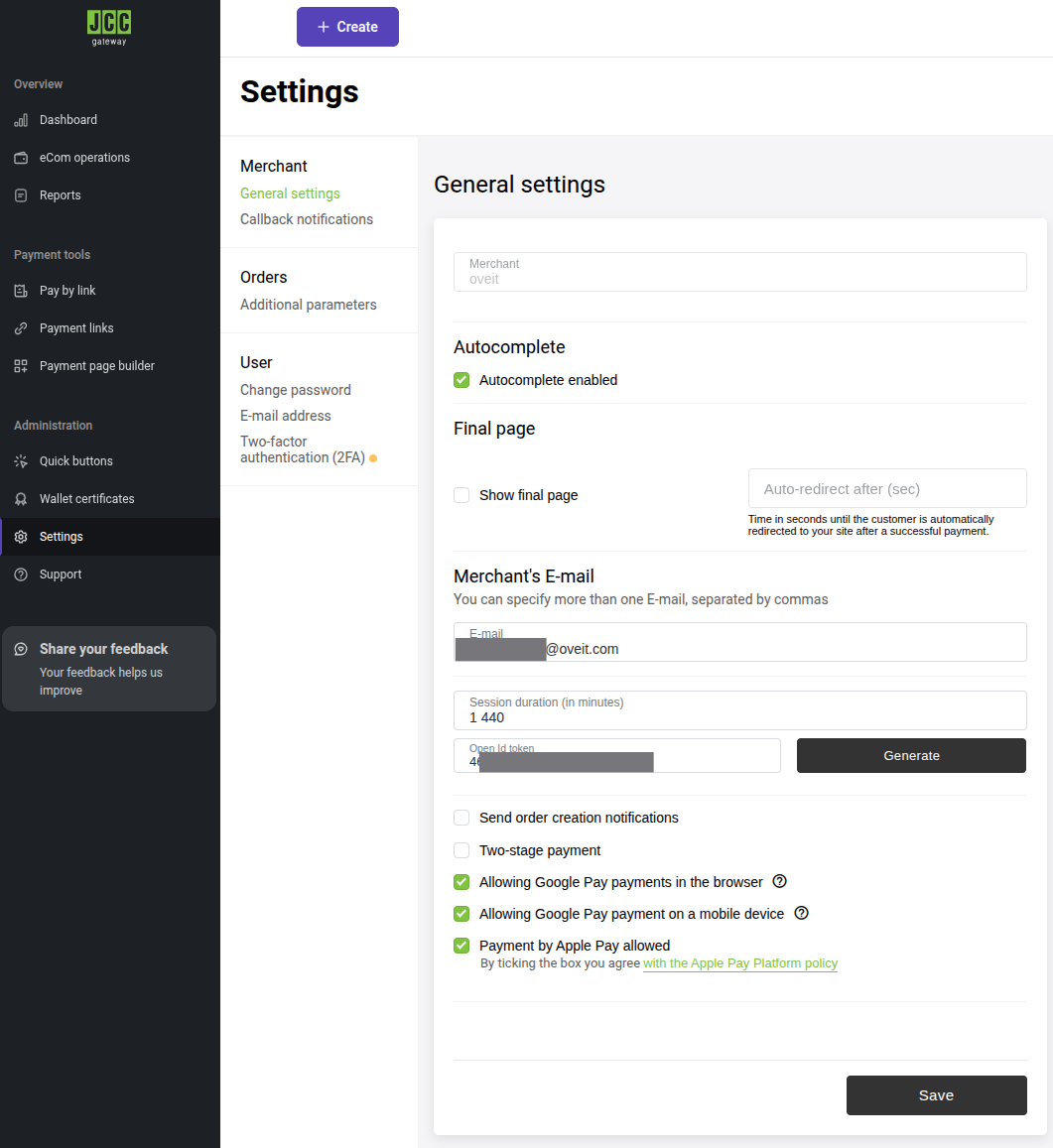
JCC Payment Settings Example

3. Save: Click Save at the bottom of the page.


Step 3: Configure Callback (IPN) Notifications #

Callback notifications (Instant Payment Notifications) ensure Oveit receives real-time updates for deposits, refunds, or reversals.

  1. Navigate to Callbacks: Go to Settings > Merchant > Callback notifications.
  2. Configure Core Settings: Use the following parameters (exactly as described below):
    • Callback notifications enabled: ON
    • Callback type: Static
    • Callback method: POST
    • Link (IPN URL): https://l.oveit.com/jcc_payments/ipn
    • Signing type: Symmetric
  3. Add Additional Parameters: You must manually add these four parameters to the Additional parameters field:
    • amount
    • currency
    • depositedAmount
    • refundedAmount
  4. Generate Callback Token: Scroll to the Callback token field.
    • Click Generate if the field is empty.
    • ⚠Important: Copy this token immediately. It is only displayed once and is required for the Oveit configuration. If you lose it, you will need to regenerate it – which will break any existing integration until the new token is updated everywhere it is used.
  5. Select Operations: Under the Operations section, check the following:
    • Deposited
    • Approved
    • Reversed
    • Refunded
  6. Save: Click Save to apply these changes.
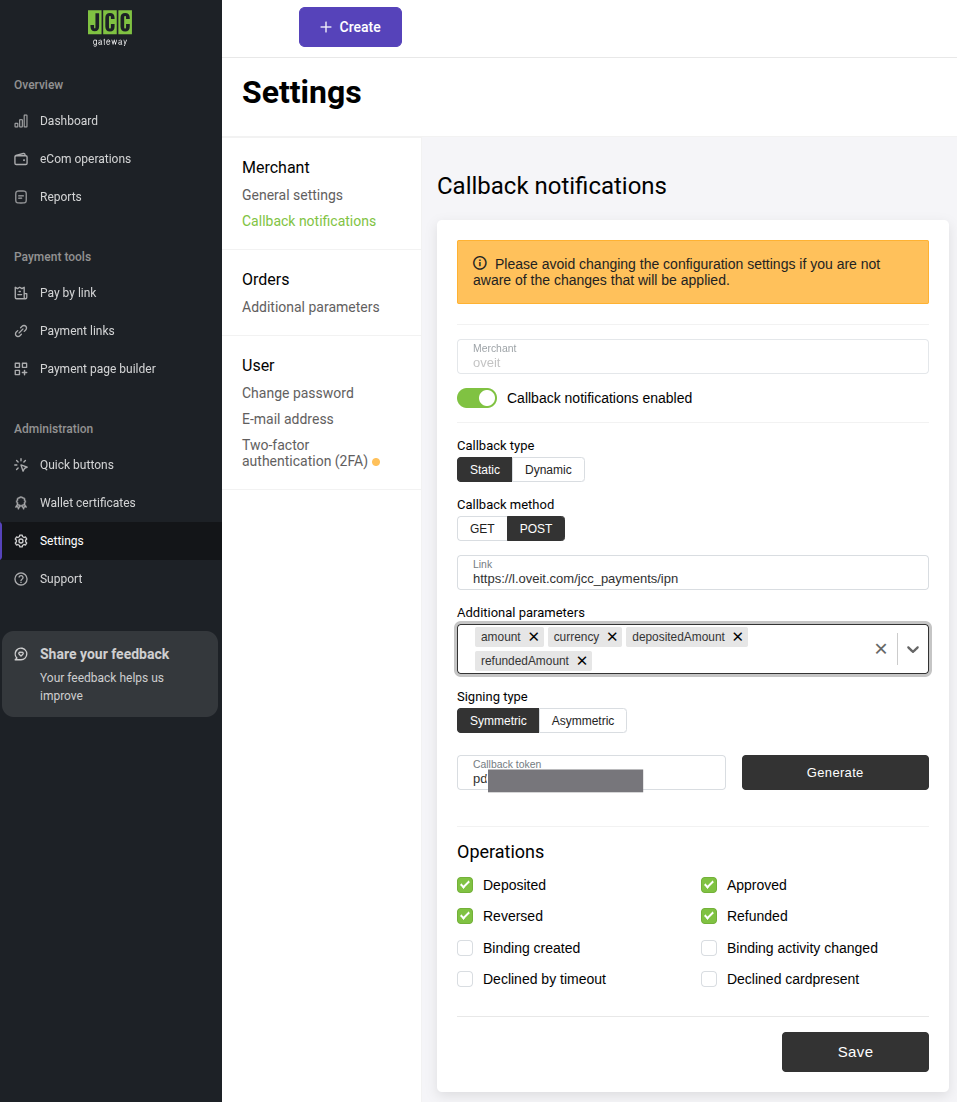
JCC Payments for ticketing callback information
JCC Gateway Callback settings

Step 4: Finalize Integration in Oveit #

Now that the JCC portal is ready, enter the following details into your Oveit payment configuration:

  • API Username: The user ending in -api.
  • API Password: The corresponding API password.
  • Callback Token: The Symmetric token generated in Step 3.4.
  • IPN URL (must match what is set in the portal): https://l.oveit.com/jcc_payments/ipn.

Pre-Live Checklist #

Before processing live transactions, verify your setup:

API credentials (username ends in -api) retrieved and stored securely
General Settings: Autocomplete enabled
General Settings: Two-stage payment DISABLED
Callback notifications toggle: ON
Callback type: Static
Callback method: POST
IPN Link set to: https://l.oveit.com/jcc_payments/ipn
Additional parameters: amount, currency, depositedAmount, refundedAmount
Signing type: Symmetric
Callback token generated and stored securely
Operations: Deposited, Approved, Reversed, Refunded all checked
All settings saved

Setup complete! Your JCC Payments Gateway is now ready to process transactions through Oveit.

Updated on March 4, 2026
JCC gateway, JCC payments, payments, ticketing

What are your Feelings

  • Happy
  • Normal
  • Sad
Share This Article :
  • Facebook
  • X
  • LinkedIn
  • Pinterest
Table of Contents
  • Step 1: Retrieve Your API Credentials
  • Step 2: Configure Merchant General Settings
  • Step 3: Configure Callback (IPN) Notifications
  • Step 4: Finalize Integration in Oveit
  • Pre-Live Checklist

Frictionless Fun for Waterparks, Resorts, and Beyond.

Oveit small icon

Attractions solutions

  • Waterparks & Aquatic Centers
  • Hotels & Resorts
  • Spa & Wellness Centers
  • Theme Parks & FECs
  • Playcenters
  • Sports Venues and Stadiums

Events solutions

  • Conferences
  • Marketing Events
  • Festivals

Company

  • Who We Are
  • Contact Us
  • Privacy Policy
  • Terms of Service

© 2026 • Oveit, Inc.
115 Wild Basin Rd. S
Austin, Texas 78746

Page load link